Over the last 18 years as a professional designer, I have learned the importance of helping clients understand file formats and proper usage for different types of file extensions. This small bit of knowledge helps the communication between designer and client become clearer and more productive, so let’s take a look at file extensions, specifically vector files and why it’s important to have one for your design and printing projects.
What is a Vector file?
Vector is a mathematical term….And I’ll stop there with math talk before things begin to sound complicated. It’s not any math that you need to know, per se, just know that vector files are created BY math with points, lines, and curves that can be scaled up or down infinitely. Because of this, a vector file is considered lossless (or ‘no image loss’).
What that means for you is that a vector file of your logo can be printed at 1 inch by 1 inch or 1 mile by 1 mile and the image will still print crisp and clear. One file can be used for business cards or billboards. Vector files can also be saved with transparent backgrounds.
Do the Zoom Test.
Take a look at the images below. We will compare a side-by-side of a non-vector (what’s called “raster” or pixel based) to the image originally created in Adobe Illustrator, which is a vector based program. Both images are at 100%. At this size they are nearly identical and can only be deciphered by design programs OR by an enlargement test (which you can do).
In between the two identical images is a 200% zoom where you can begin to see the individual pixels in the top circle, which is a zoom from the first image (non-vector). Compare this to the circle on the bottom, which is a zoom of the second image, and it begins to make sense how a vector image proves more useful for applications that require great enlargement. At 200% or 2500%, the vector image will remain crisp and clear.
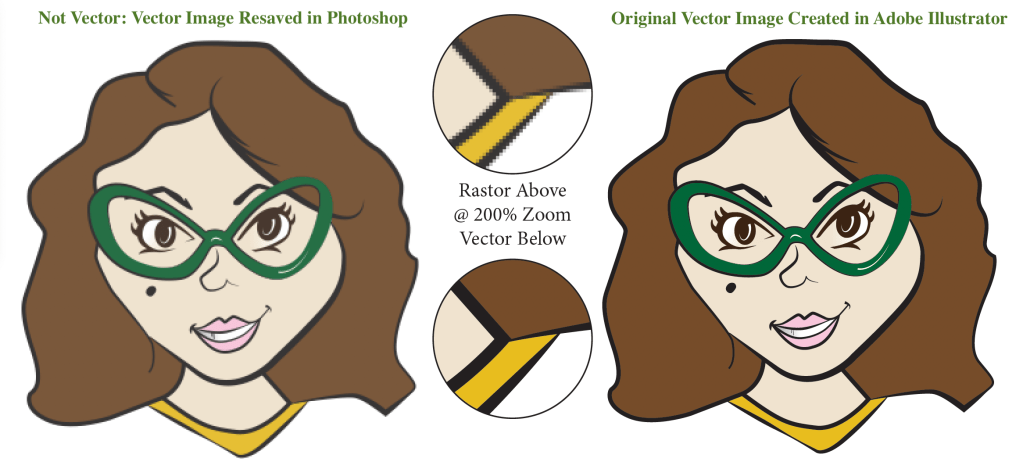
Vector file extensions are .ai, .eps, .svg, and some .pdf files. Vector files must be created in vector programs, such as Adobe Illustrator or Adobe InDesign. PDFs can also contain raster images which we will cover next, and some .ai, .eps, .svg files can be falsely saved. Just because a file has one of the above mentioned file extensions does not mean that it is truly a vector. Alway enlarge your graphics to over 500% and check to see if your image retains smoothness and clarity. Enlarging your graphics in this way will almost always show you if your file is made of pixels or is vector.
What is non vector, or raster, file?
Raster images are essentially photographs. Cameras (including your phone) create raster images. A raster image consists of pixels, which are small squares/dots of color arranged together like a collage to create a larger image. In traditional art terms, it is similar to pointillism. When a raster image is created, the number of pixels in any square inch is predetermined by the artist and can not be changed without quality loss. Raster images are considered lossy files, meaning they don’t always retain every bit of information when used and resaved for different applications.
Because raster images are made of pixels, resolution (which is image quality) is measured in terms of ppi (pixels per inch) or dpi (dots per inch). 300 dpi at the size that an image needs to be printed is considered high resolution. Print images need more dots of color per square inch to render a clearer image and avoid pixelation (for pixelation, think of a Minecraft image – visible squares).
72-96 dpi is considered web/low resolution. These images need less dots per square inch so they will have a smaller file size and upload to a web server faster. For this reason, it is not advisable to take an image from the web to print because low res files are not ‘dense’ enough in pixels to print clearly.
Pixels reduce proportionally to size enlargement. If a file is 8×8 inches at 300 dpi, then enlarging to 200% – 16×16 inches, will reduce the dpi by 50% to 150 dpi. You can not enlarge a raster image without image quality loss, which brings us back to the importance of having a vector file and I do apologize for throwing some math in there at the end.
.jpg, .gif, .png, and some .pdf files are raster. Of these, PNGs can be saved with transparent backgrounds. JPGs will alway have a white background where there is no color in a graphic. Screenshots will always be raster images.
Why You Should be Investing in a Skilled Professional Designer
As you consider different options to create graphics for your business, ensure that you will be getting vector file of your branding assets. It is important to work with a graphic designer that has a thorough understanding of file creation and application. Planning for the growth of your business requires investment in a quality professional. Cutting cost on graphic design and branding could cost more in the long run. Do not trust a graphic designer that creates logos in Photoshop!
Many do-it-yourself programs, (especially in free subscriptions) or AI prompting programs will only create raster images. While you can create beautiful logos with these programs, you will be limited with how you can use your files and may have to pay someone eventually to create the vector equivalent. Convenience always comes with a cost. Making smart decisions on the front end and choosing to work with a quality, seasoned designer will create a beautiful partnership in your journey towards success, saving you trouble in the end.
(Original content, without ai assistance. Initially written as teaching material for students and republished for AlphaGraphics Hoover in July 2023.)
 The Popwell Collection