
2025 is upon us and now is the time to talk about resolutions… Let’s not.
Not THOSE kinds of resolutions anyway. Let’s talk about resolution that you can’t break, but knowing the difference can make or break you when it comes to clarity and quality in your print and digital projects.
What is resolution?
Image resolution is a composite term for dpi (dots per inch) and quality of an image. It’s fair to say that the amount of dpi an image has correlates to quality of image, although there are exception to this (of course there are, like camera settings and the photographer’s skill level).
High Resolution is of 240 to 300 dpi (preferably 300) AT THE PRINTED SIZE that your image needs to print. I said print(ed) twice because this is the most important aspect to ensure that you have a high quality output. 300 dpi at the final printed size. If your image is to be printed at 8″x10″, it should be 300 dpi and 8″ x 10″. As size increases, resolution decreases proportionally. If your 8″x10″ 300 dpi image is changed to 16″x20″ in size, resolution will decrease to 150 dpi.
For print, all images should be saved in CMYK color mode. Take a look at the comparison below where the top image is (high) print resolution at 300 dpi and the bottom is (low) web resolution at 72 dpi blown up to the same size to compare. You can see where we lose quality of image in the bracelets and skin. The overall below image looks fuzzy and will print that way.
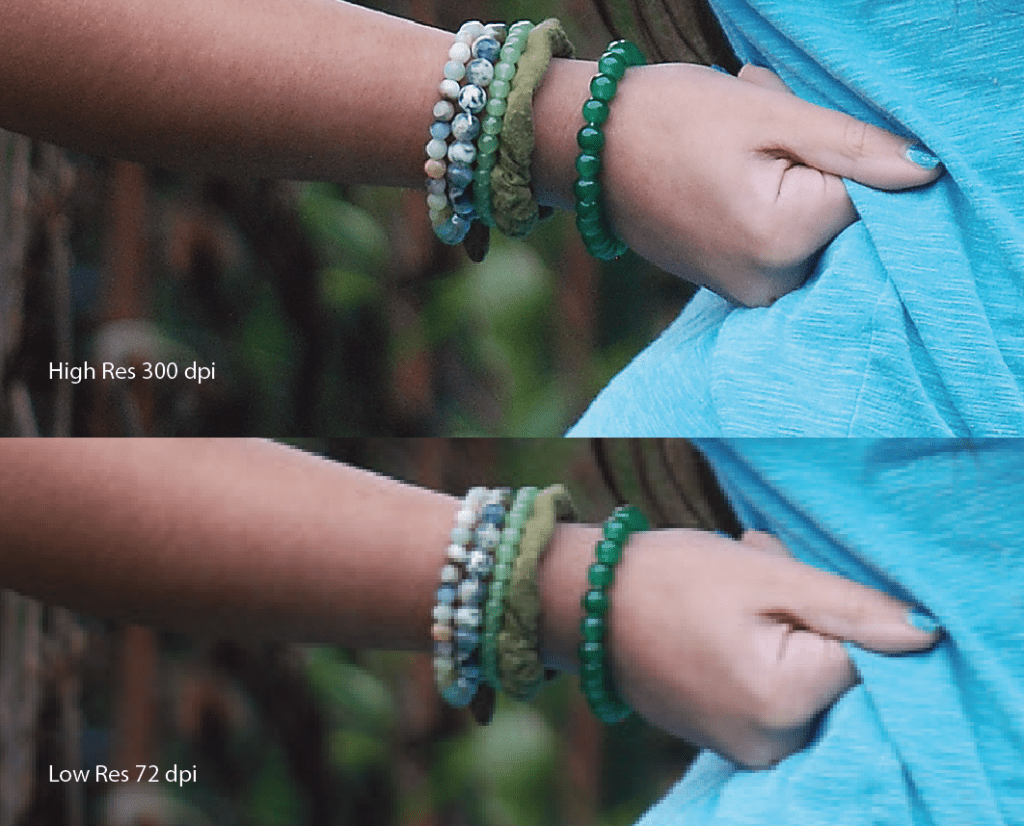
Low resolution is anything below 200 dpi. Low resolution is not ideal for printing, but does serve a separate purpose, which is digital media. Pictures and graphics pulled from the internet are often very low resolution, typically 72 dpi. Avoid these graphics for print, as they will appear pixelated, blurry, or blocky when printed.
Why You Need Both
When you think of resolution in regards to images, you get a comprehensive understanding of high AND low resolution. Resolution is not only important for printing, but just as important for web. You should be in the habit of having a high res and low res copy of any image you plan to use across omni channel campaigns. High resolution creates larger file sizes. This is good for print, but bad for web page loading speeds. Slow load speed increases bounce rate on your website. People don’t want to stick around and wait for your photos to pop up on your pages.When you have several photos, this can really bog down the speed of your website. The goal of your website is to solve a problem for your viewer as quickly as possible. Anything that hinders that objective, hinders your potential for growth.
For the image that I took snippets from above, my high res photo is 16 MB and my low res image is 180 KB (or 0.18 MB).
It’s also important to note that unless permission has been given, graphics and images pulled from the internet are property of the original creator and should be not be used for your gain. Even if permission is given, assume that any images screen shot or dragged off the internet will be low res. High res images CAN be downloaded off the internet from stock photo and personal sites, but just dragging an image from the web to your desktop is almost always going to be low res.
For digital, social media, or web, all images should be saved in RBG color mode.
If you are posting on any platform, it’s important to understand image resolution. In my near 2 decades as a graphics specialist, the conversation of resolution comes up most frequently. I have spent many hours over my career explaining this bit of information to clients, individuals, and novice designers. (Information compiled without AI assistance.) Subscribe below and let’s connect.
 The Popwell Collection